Set Up LinkBox Orchestrator
Follow these steps to download, install, and connect your Mac to LinkBox AI. The entire setup takes less than 5 minutes.
Step 1: Download
Get the latest version for macOS
Download the LinkBox Orchestrator DMG file. The app is signed and notarized by Apple for your security.
Troubleshooting
"App is damaged and can't be opened"
This happens when macOS quarantine flag is set. Run this command in Terminal:
xattr -cr /Applications/LinkBox\ Orchestrator.appOrchestrator shows "Connecting..." but never connects
Check your internet connection and firewall settings. The Orchestrator needs to reach:
- *.supabase.co (authentication & database)
- *.googleapis.com (Gemini AI)
Voice commands aren't working
Make sure microphone permission is granted in System Preferences → Privacy & Security → Microphone. Also check that your default input device is set correctly in System Preferences → Sound → Input.
iOS app can't find my Mac
Both devices must be on the same local network. If you're using a VPN, try disabling it. The Orchestrator listens on ports 8080 (HTTP) and 8081 (WebSocket). Make sure your firewall allows these.
Remote Access: Port Forwarding
Control your Mac from anywhere in the world
By default, the Orchestrator only works on your local network. To control your Mac remotely (from cellular data or another location), you need to set up port forwarding on your router.
Security Note
Port forwarding exposes your Mac to the internet. The Orchestrator uses authentication, but for maximum security, consider using a VPN instead of port forwarding.
Required Ports
HTTP API
TCP Protocol
Used for REST API calls, health checks, and status requests.
A2A WebSocket
TCP Protocol
Used for real-time bidirectional communication from iOS app.
Step 1: Find Your Mac's Local IP
Open Terminal and run:
ipconfig getifaddr en0This will show something like 192.168.1.100. Write this down.
Step 2: Configure Your Router
Log into your router's admin page (usually 192.168.1.1 or 192.168.0.1) and find the Port Forwarding or Virtual Server section. Add two rules:
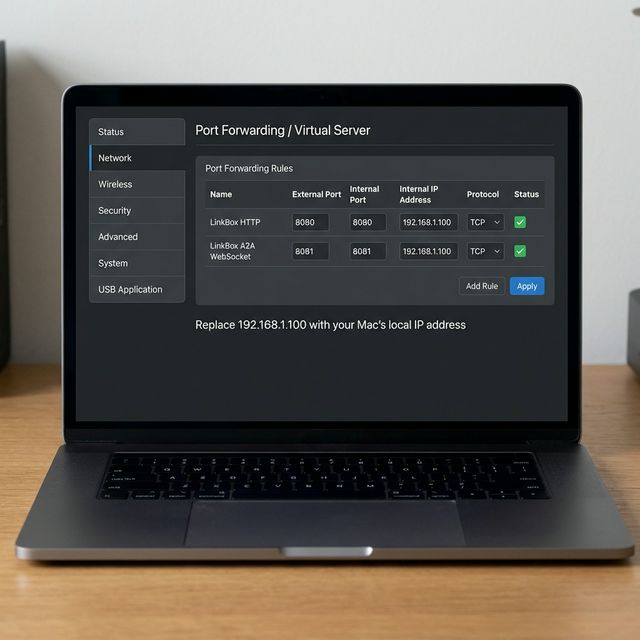
| Name | External Port | Internal Port | Internal IP | Protocol |
|---|---|---|---|---|
| LinkBox HTTP | 8080 | 8080 | 192.168.1.100 | TCP |
| LinkBox A2A | 8081 | 8081 | 192.168.1.100 | TCP |
Note: Replace 192.168.1.100 with your Mac's actual local IP address.
Step 3: Find Your Public IP
Your public IP is what the iOS app will use to connect. Visit whatismyip.com or run:
curl ifconfig.meStep 4: Configure iOS App
In the LinkBox iOS app, go to Settings → Orchestrator and enter your public IP address (e.g., 73.xxx.xxx.xxx). The app will connect over the internet to your Mac.
Pro Tip: Use Dynamic DNS
Most home internet connections have dynamic IPs that change periodically. Use a free Dynamic DNS service like No-IP to get a hostname that always points to your home IP.